A tour of the sidebar
Where everything lives in Wikidoc, and why some items may be missing from yours.
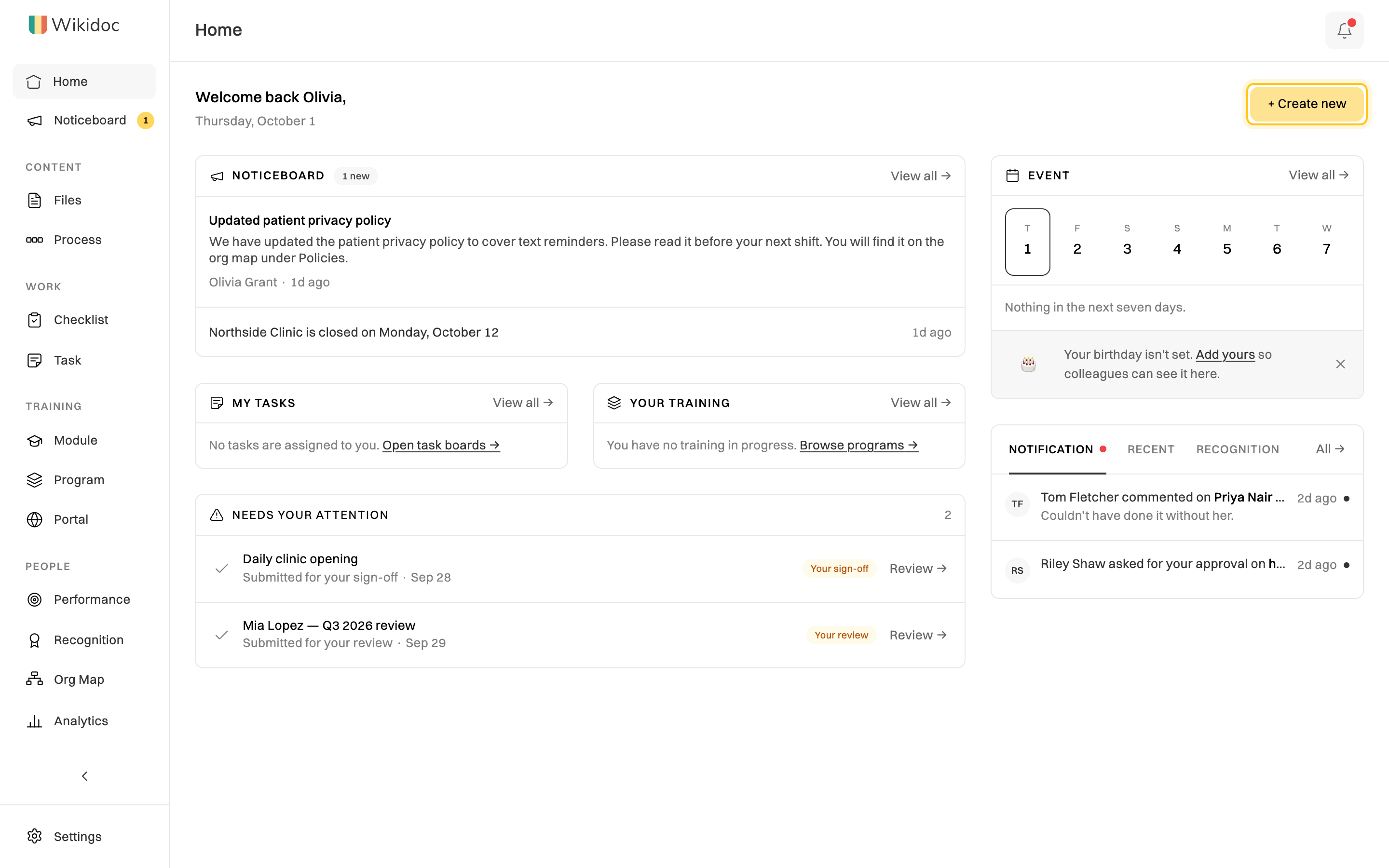
The sidebar on the left of every screen groups Wikidoc by what you’re doing: what your organization knows (Content), what it does each week (Work), how it trains people (Training), and how its people are doing (People).

At the top
Section titled “At the top”- Home: your starting point. On Free and Pro it shows what you can make. On Team it’s a dashboard: announcements, your tasks and training, what needs your attention, upcoming events and recent activity. Click + Create new to make anything.
- Noticeboard: announcements and events for your organization. A number shows how many you haven’t read. See Noticeboard. (Team)
Content
Section titled “Content”- Files: your documents: step-by-step guides made from a recording, with their videos, slides and quizzes. Organize them in folders. See Organize files: folders and team workspaces.
- Process: process maps, which show a whole process as a flowchart. See Create a process map.
- Checklist: recurring checklists your team ticks off, and the ones waiting for your review. See Build a checklist template. (Team)
- Task: task boards. A number shows how many cards have changed since you last looked. See Task boards. (Team)
Training
Section titled “Training”- Module: training modules, each built from a document, with slides and a quiz. See Browse and use the training library.
- Program: training programs, which bundle modules and assign them to people with due dates. (Team)
- Portal: client portals, which share chosen content with people outside your organization. (Team; not shown to Viewers)
People
Section titled “People”- Performance: goals, KPIs and performance reviews. See Performance reviews. (Team)
- Recognition: thank a colleague publicly. See Recognition, points and awards. (Team)
- Org Map: who reports to whom, plus the tools, policies, assets and providers your organization uses. See Build your org map. (Team)
At the bottom
Section titled “At the bottom”- Analytics: training completion, task flow, performance, portal visits and more. See What Analytics shows. (Team; Managers and Admins only)
- Teams: your team workspaces, each with its own files. Managers and Admins see + New team here. See Teams and team workspaces.
- Upgrade: shown on the Free plan. See Plans compared.
- Settings: your account, your organization’s members, notifications and billing.
Features marked (Team) stay in the sidebar on Free and Pro, and open an upgrade prompt.
Why is something missing?
Section titled “Why is something missing?”Two things decide what your sidebar shows:
- Your role. Viewers don’t see Portal. Analytics is for Managers and Admins. See Roles and permissions.
- Your teams. The Teams section shows only the teams you belong to, and only if you belong to one or can create one.
Make the sidebar smaller
Section titled “Make the sidebar smaller”Click the arrow at the bottom of the sidebar to shrink it to icons. Hover over an icon to see its name. Click the arrow again to expand it. Wikidoc remembers your choice on this device.
Home on the Team plan
Section titled “Home on the Team plan”