Welcome to Wikidoc
What Wikidoc does, how its parts fit together, and which plan includes what.
Wikidoc is an operations management platform for SMEs. It turns the way your business works into a system that people can follow, managers can see, and the business can improve.
- People can follow. Record a task once, and Wikidoc turns it into a step-by-step guide, a training video, slides and a quiz. Process maps, training and checklists help everyone do the work the same way every time.
- Managers can see. Checklist runs, training records, tasks and KPIs show what’s been done, what’s overdue and where to step in, without chasing people.
- The business can improve. When you find a better way to work, update the guide, retrain the team and watch the results.
Knowledge that lived in a few people’s heads becomes something the whole organization owns, so new people get up to speed faster, everyone works to the same standard, and there’s a record for compliance.
Wikidoc doesn’t replace your accounting, booking or payroll software. It sits alongside them and describes how your people, processes, policies and tools work together.
Sign in at app.wikidoc.ai. New here? Start with the Quick start.
Who it’s for
Section titled “Who it’s for”Any SME can use Wikidoc. What it delivers depends on the kind of business:
| Kind of business | What Wikidoc helps you do |
|---|---|
| Growing fast | Grow the team without losing control of how work gets done |
| Founder-led | Rely less on the owner and a few key people |
| High staff turnover | Get new people productive faster and more consistently |
| Compliance-heavy | Know what’s required, and keep a record that it was done |
| Professional services | Deliver work to a standard while leaving room for judgment |
| Field and service teams | Keep work consistent when people are away from their manager |
| Several locations or franchises | Run every site the same way, and roll out changes to all of them at once |
How the parts fit together
Section titled “How the parts fit together”| Part | What it’s for | Where it is |
|---|---|---|
| Files | Step-by-step guides (SOPs) made from a screen recording or a video, with an AI-narrated video, slides and a quiz | Content → Files |
| Process maps | Flowcharts of a whole process: who does each step, and where it branches | Content → Process |
| Checklists | Recurring lists your team ticks off, with a manager’s sign-off and a record of every run | Work → Checklist |
| Task boards | Cards that move through stages, each linked to the guide or map it’s about | Work → Task |
| Training | Modules made from your guides, bundled into programs and assigned to people | Training → Module, Program |
| Client portals | A branded site that shares chosen content with clients and contractors | Training → Portal |
| People | Performance reviews, recognition, and the org map of people, tools and policies | People |
| Noticeboard | Announcements and events for the whole organization, and a company calendar | Noticeboard |
They connect. A process map step can link to the guide that explains it, a checklist can be generated from a guide, and a training module is built from a guide. Your colleagues see all of it in one place, organized by teams.
Your organization
Section titled “Your organization”Everyone who signs up with your company’s email domain joins the same organization and shares its content. Each person has a role (Viewer, Editor, Manager or Admin) that decides what they can do. See How organizations, members and seats work.
If you sign up with a personal address, such as Gmail, you work on your own. See Create your account and sign in.
Which plan includes what
Section titled “Which plan includes what”Everyone starts on Free, with three of each kind of content. Pro removes the limits for one person. Team covers your whole organization and adds checklists, task boards, the Noticeboard, training programs, the org map, approvals, analytics, performance, recognition and client portals. See Plans compared.
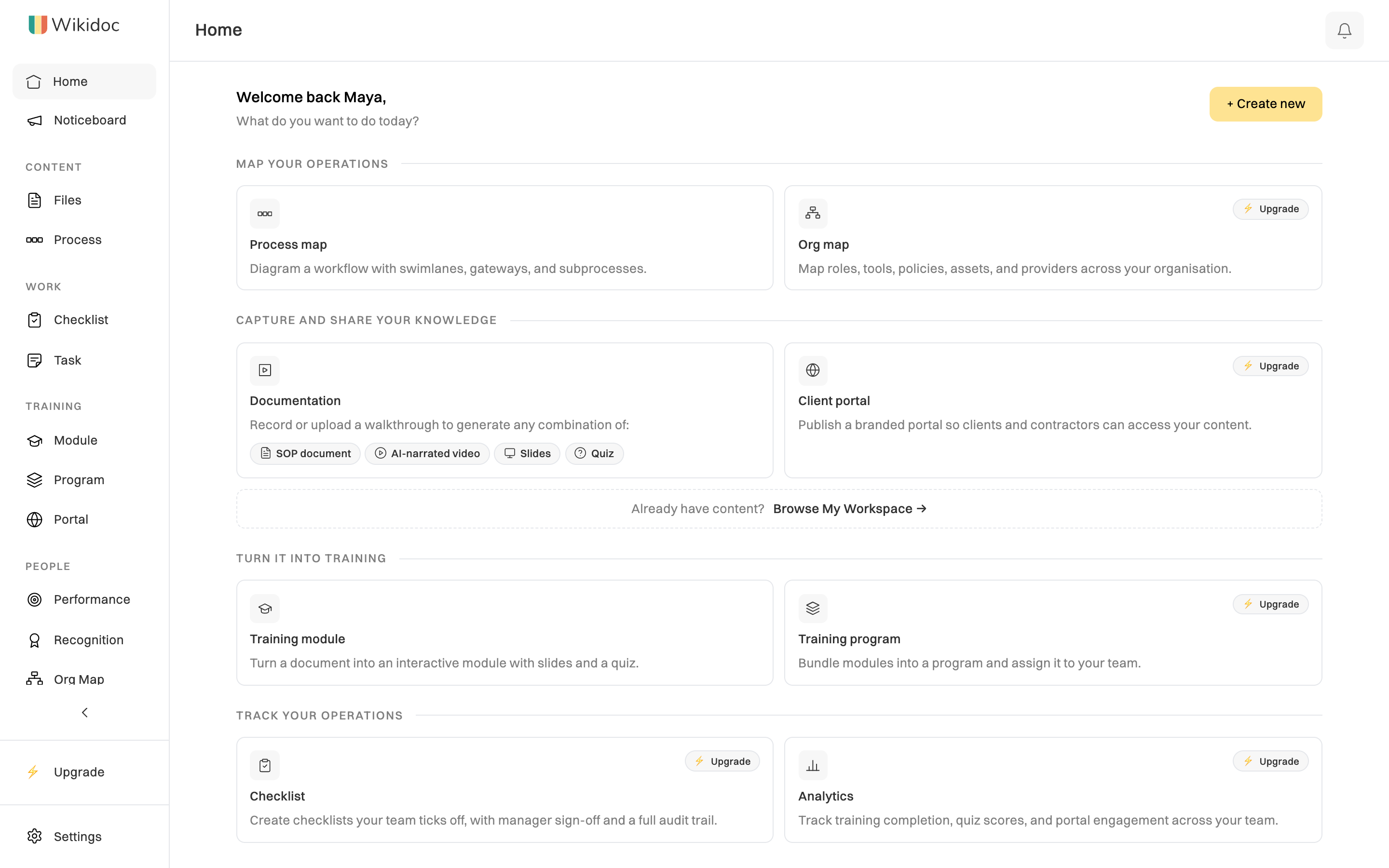
On Free and Pro, Home shows what you can make, and marks the Team features with Upgrade: